(425) 438-2533

Barcode Security: Protecting Systems from Malicious Barcode Data

Barcode scanners are trusted tools for capturing information quickly and accurately. But when a scanner operates as a keyboard-emulation device, the information contained in a barcode may be passed to the connected computer as keyboard input.

That creates a potential security concern when barcode content includes unexpected commands or control characters.

ID Integration developed the patented BarCodeOS® Security Filter to address this risk. Embedded directly into the scanner's operating system, the Security Filter evaluates decoded barcode data before it reaches the host computer, providing built-in protection at the point of capture.
Understanding the Risk

How Can a Barcode Become a Security Threat?

Many barcode scanners operate in keyboard-emulation mode, sometimes called keyboard wedge mode. In this configuration, the scanner behaves like a keyboard, transmitting decoded barcode information to the connected computer as keystrokes. This makes barcode capture convenient because applications can receive scanned information without specialized scanner integration.

However, the same behavior creates a potential exposure. If a scanner transmits unexpected control characters or command sequences, the connected application or operating system may interpret that input differently from ordinary barcode data.

A maliciously constructed barcode could exploit this behavior under certain conditions, depending on the scanner configuration, receiving application, operating system, and available permissions.

Barcode data should be validated before it reaches connected systems, particularly when scanners operate as keyboard-input devices. This helps prevent unexpected or unauthorized commands from being processed as legitimate input.
2D Barcode Considerations

Why 2D Barcodes Deserve Additional Attention

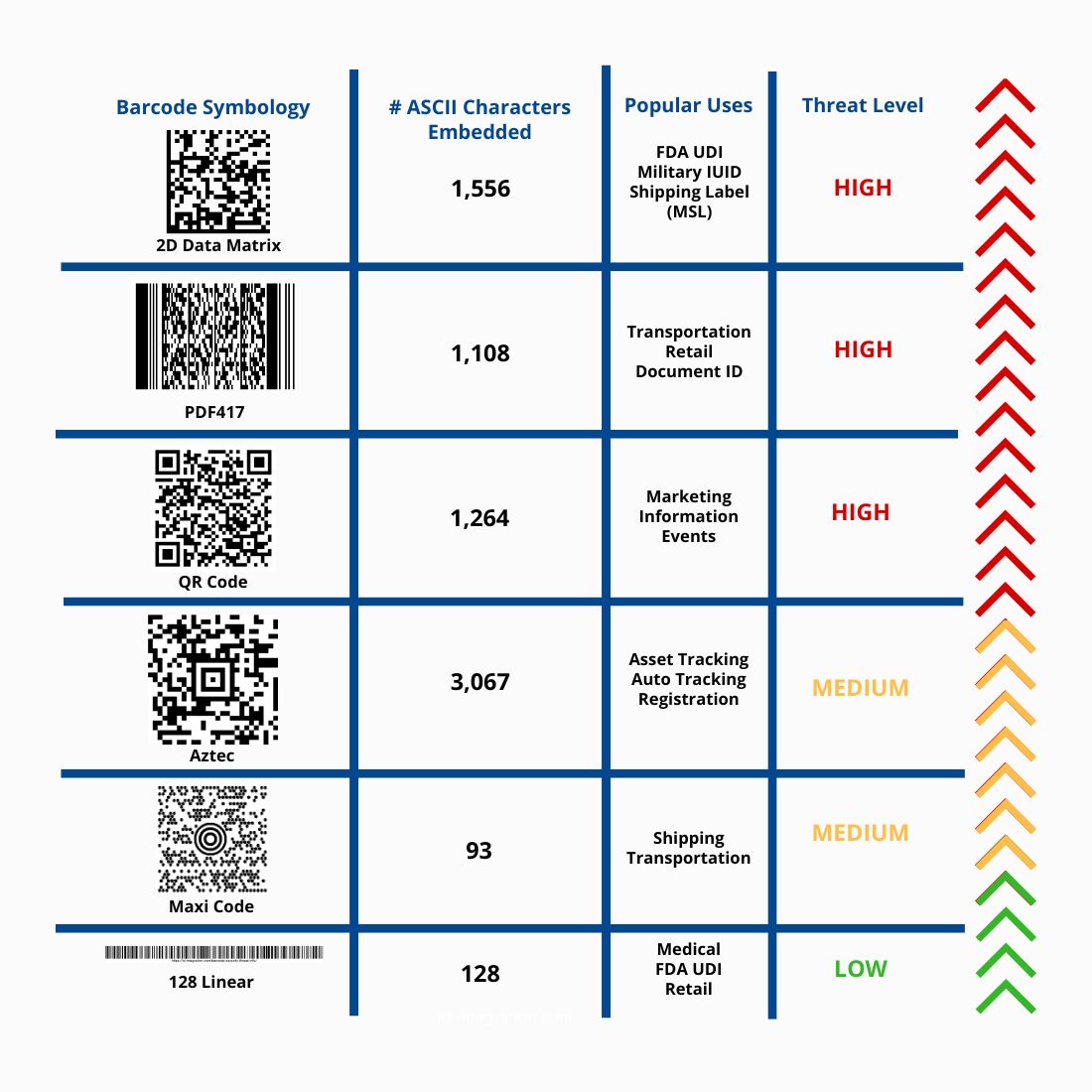
Traditional linear barcodes generally carry relatively limited information. Two-dimensional symbologies, including QR Code, Data Matrix, PDF417, and Aztec, can encode substantially more data. That capacity supports important applications such as medical device identification, inventory management, logistics, and automated data capture.

It also means a barcode may contain more than a simple identifier. Depending on the symbology, scanner configuration, and receiving system, decoded information may include characters or sequences that require additional validation before transmission.
Chart illustrating increasing barcode security threat levels as data capacity increases, from low for Code 128 linear barcodes to high for 2D Data Matrix barcodes.
Built-In Protection

Barcode Security Built Into the Scanner

BarCodeOS® provides protection at the point of data capture through its patented Security Filter, which is embedded directly into the barcode scanner's operating system. Rather than relying on an optional software setting or a separate application running on the host computer, the Security Filter evaluates decoded barcode data within the scanner before that information is transmitted.

The Security Filter is designed to identify and block unauthorized operating system command functions embedded in barcode data. Because the protection is built into the scanner's operating system, it cannot be disabled or reconfigured through normal user settings. This tamper-resistant architecture helps maintain consistent security controls across deployed scanners while supporting barcode validation, data formatting, and workflow-specific processing.

How BarCodeOS® Supports Secure Data Capture

BarCodeOS®-enabled scanners combine security filtering with intelligent barcode processing capabilities, including:

  • Embedded security filtering: Evaluate decoded barcode data before transmission to identify and block prohibited command functions.
  • Data validation: Check captured information against defined formats, syntax, and application requirements.
  • Data parsing: Extract relevant information from encoded barcode data.
  • Data formatting: Structure captured information for the receiving application or enterprise system.
  • Scanner-level feedback: Alert users when scanned information fails applicable validation or security checks.
  • Workflow-specific configuration: Support data capture requirements across different operational environments.
Available functionality depends on the scanner model, BarCodeOS® configuration, and application requirements. By processing data within the scanner, BarCodeOS® helps organizations maintain efficient barcode capture while introducing an additional security control before information enters connected systems.
Why It Matters

Why Scanner-Level Security Matters

Barcode scanners are often treated as simple input devices. Yet they may be connected to workstations, enterprise applications, inventory systems, and other operational technology environments where reliable data capture is essential. A malicious barcode does not necessarily need to exploit the barcode scanner itself. The risk may arise when unexpected input passes through the scanner and is interpreted by the connected system.

Potential consequences depend on the receiving environment and its security controls, but may include:

  • Unauthorized execution of commands
  • Disruption of applications or workstation functions
  • Modification or deletion of accessible information
  • Exposure of sensitive data
  • Operational interruptions and additional IT investigation or recovery work

The severity of an incident depends on factors such as system permissions, application behavior, endpoint protections, and the capabilities available to the attacker. Adding security filtering at the scanner provides an opportunity to stop prohibited command input before it reaches the receiving system.

Layered Security

Make Barcode Security Part of a Defense-in-Depth Strategy

Scanner-level filtering is an important safeguard, but effective cybersecurity requires multiple layers of protection. Organizations should evaluate how scanners are configured, how decoded information reaches applications, and how unexpected input is handled. Key considerations include:

Scanner Configuration

Understand whether devices operate in keyboard-emulation mode or another supported communication mode. Establish consistent configuration standards across deployed devices.

Input Validation

Define which data formats, characters, and command functions are appropriate for each workflow. Validate information before it is processed by downstream applications.

Application Security

Ensure receiving applications handle unexpected or untrusted input appropriately, including input that originates from barcode scanners.

Endpoint Protection

Maintain appropriate operating system security, access controls, software updates, and endpoint protection measures.

Device Management

Control configuration changes and maintain consistent security settings throughout the scanner deployment.

Workflow Testing

Evaluate barcode capture and data handling under representative operating conditions, including unexpected or invalid barcode content.
Together, these measures help reduce exposure while maintaining the efficiency of automated data capture. BarCodeOS® contributes an additional layer of protection by applying embedded security filtering within compatible scanner hardware.
Workflow Applications

Supporting Secure Data Capture Across Healthcare and Enterprise Workflows

Barcode scanners support critical identification and data capture processes across healthcare, government, logistics, manufacturing, and other enterprise environments. In healthcare, barcode capture supports medical device identification, FDA Unique Device Identification (UDI), inventory workflows, and the transfer of encoded information into hospital applications.

In government and enterprise environments, barcode technology supports asset identification, inventory management, equipment tracking, and specialized data capture requirements. These workflows depend on accurate information moving reliably between physical assets, barcode scanners, and connected systems.

BarCodeOS® supports this process by combining barcode-data processing, validation, formatting, and embedded security filtering within compatible scanner hardware. The goal is to maintain efficient, reliable data capture while applying appropriate controls to the information entering enterprise systems.

Have Questions About Barcode Security?
ID Integration can help evaluate scanner behavior, barcode-data requirements, validation rules, and the receiving applications that depend on captured information.

Discuss your requirements with our team at (425) 438-2533.
ID Integration Innovation

Patented Barcode Security Technology Developed by ID Integration

ID Integration's work on barcode security grew from recognizing that the convenience of keyboard-emulation scanning could introduce risks when decoded information is transmitted without appropriate evaluation. The company developed the BarCodeOS® Security Filter to address this challenge through processing embedded directly within the scanner's operating system.

The patented technology provides a built-in security control designed to prevent unauthorized command functions from reaching connected systems through barcode input. Unlike optional software-based protections that may be disabled or bypassed through normal configuration settings, the BarCodeOS® Security Filter is integrated into the scanner's operating system and cannot be disabled or reconfigured through normal user settings.

This approach reflects ID Integration's broader systems integration philosophy: understand how data moves through a workflow, identify where reliability and security controls are needed, and connect technology to the requirements of the operating environment.
Frequently Asked Questions About Barcode Security

Can a barcode contain malicious commands?

Yes. A barcode can encode data that includes unexpected characters or command sequences. Whether that content creates a security risk depends on how the scanner transmits the data and how the connected system interprets it.

Why does keyboard-emulation scanning create a potential security risk?

In keyboard-emulation mode, a barcode scanner sends decoded information as keyboard input. This is convenient for everyday scanning, but it makes the handling of unexpected or unauthorized input an important security consideration.

Can the scanner's Security Filter be disabled?

No. The patented Security Filter is embedded directly in the scanner's operating system and cannot be disabled or reconfigured through normal user settings. This tamper-resistant design helps prevent users from inadvertently bypassing the scanner's built-in security controls.

Are QR codes and Data Matrix barcodes inherently unsafe?

No. Two-dimensional barcodes are widely used for legitimate identification and data capture. Security concerns arise when untrusted content is interpreted or acted upon without appropriate controls.
Next Steps

Evaluate Barcode Security at the Point of Capture

Understanding how barcode data enters your systems is an important step toward reliable and secure automated data capture. ID Integration works with organizations to evaluate scanner configurations, barcode-data requirements, validation rules, and integration with receiving applications. Whether you are evaluating existing barcode capture processes or planning a new deployment, our team can help identify the technology and integration requirements appropriate for your environment.

Prefer to discuss your barcode security requirements by phone? Call (425) 438-2533.
Discuss Your RequirementsExplore Intelligent Scanners
For more than 25 years, hospitals, healthcare organizations, public agencies, and government organizations have trusted ID Integration to design and integrate asset tracking and automation solutions that align with their workflows, existing systems, and security requirements.
(425) 438-2533
sales@id-integration.com
13024 Beverly Park Road, Suite 104 Mukilteo, Washington 98275
ID-Integration.com
Copyright © 2026 ID Integration, Inc. | BarCodeOS® is a trademark of ID Integration, Inc. All rights reserved.
Design & content by Moore Than SEO
linkedin facebook pinterest youtube rss twitter instagram facebook-blank rss-blank linkedin-blank pinterest youtube twitter instagram